ENEnglish
 LTLietuviškai
 DEDeutsch
 FRFrançais
 RUРусский
 ESEspañol
 PLPolski
 ITItaliano
 UKУкраїнська
 CSČeština
 PTPortuguês
 JA日本語
 LVLatviešu valoda
 ETEesti
 HUMagyar
 IDBahasa Indonesia
 TRTürkçe
 HIहिन्दी
 ELΕλληνικά
 ARالعربية
 THไทย
 VITiếng Việt
 RORomână
 MSBahasa Melayu
 BNবাংলা
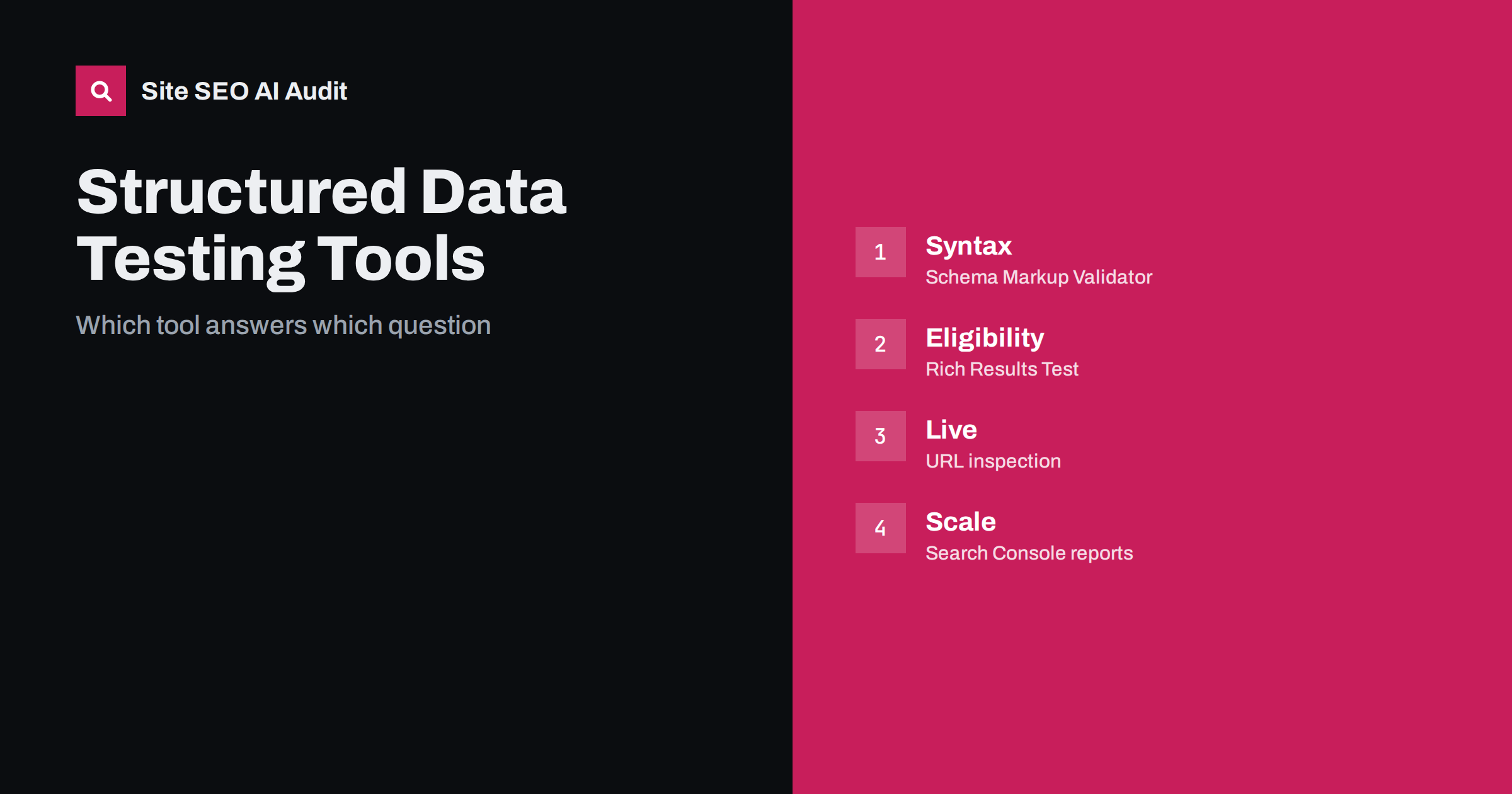
Short answer: No single tool answers every structured data question. The Schema Markup Validator checks whether markup follows the schema.org vocabulary. The Rich Results Test checks whether a page meets Google’s requirements for specific search features. The URL inspection tool shows what Google found on a live or indexed page, and Search Console’s enhancement reports show trends across the whole site. Use them in that order, and add a crawl for scale.
Teams often ask why one tool shows no errors while another shows warnings, or why markup that passed a test never produced a rich result. The answer is that the tools have different purposes. One checks the language of the data, another checks eligibility for particular features and others show what has happened in the real index. This guide compares the main options, explains what each can and cannot prove and suggests a workflow. For fixing the errors found, read the guide to structured data errors.
Schema Markup Validator
The Schema Markup Validator, run by the schema.org community after Google retired its older generic testing tool, checks structured data against the schema.org vocabulary. You can paste code or enter an address. It detects JSON-LD, Microdata and RDFa, shows the entities and properties it found and reports syntax errors, unknown types and unknown properties.
It is useful for general validity and for markup types that Google does not use for features, because it is not tied to any search engine’s rules. It does not say whether a page will receive a rich result, and it does not enforce Google’s required properties. Use it as the first check to make sure that the data is well formed and that the types and properties are correct. The difference between formats is covered in the guide to JSON-LD and Microdata.
Rich Results Test
The Rich Results Test is Google’s tool for checking whether a page, or a code snippet, is eligible for rich results. It lists the types of structured data it supports for features, flags errors that prevent eligibility and warnings for recommended properties that are missing. You can test a public address or paste code, and it can show the rendered HTML as Googlebot sees it.
Its limits are important. It covers only the types that Google uses for search features, and it does not list other schema.org types. A pass means the markup is eligible, not that a rich result will appear, since Google decides this by quality, the query and the policies for each feature. The tool tests a live fetch, so it may differ from what was indexed some days ago. It also needs public access: pages behind a login or blocked in robots.txt cannot be fetched.
URL inspection in Search Console
The URL inspection tool reports what Google knows about a specific address in your own property. It shows whether the page is indexed, the canonical Google chose, the last crawl and, in the enhancements section, the structured data it detected. A live test fetches the page now and shows the rendered HTML and any detected markup.
Use it to confirm that the markup is present on the version Google actually crawled, particularly for pages where the markup is added by JavaScript, which can fail silently. Comparing the indexed version with the live version tells you whether a fix has been picked up. It handles one address at a time, so it is for diagnosis and not for audits. The related guide to the URL inspection tool explains the other reports in detail.
Search Console enhancement reports
The enhancement reports in Search Console group pages by structured data type, such as product, FAQ-related or breadcrumb markup where supported, and show counts of valid pages, pages with warnings and pages with errors over time. They are the best way to monitor a site at scale, because they reflect what Google found while crawling. They also show which issues are most widespread, so you can fix templates instead of single pages.
They have a delay: the data arrives after crawling, so a fix may take days or weeks to show. They also appear only for types that Google supports and only when it detects enough markup. After a fix, use the validation feature to ask Google to recheck the affected pages, and watch the trend, not a single day. The wider set of reports is described in the Search Console setup guide.
Crawlers and audits
Site-wide tools extend the check to every page. A crawler visits each address, parses the markup it finds and reports pages with missing, invalid or inconsistent data. This is the only practical way to answer questions such as which pages have no product markup, which have two conflicting blocks and which templates changed after a release. A crawler does not replace Google’s tools, since it cannot say what Google will do with the data, but it finds problems in bulk and lets you act before the reports in Search Console update.
Browser extensions and developer tools are useful for quick looks. They show the markup a page contains, though they may not match what a crawler sees if the markup is added by script. Use view source and the rendered HTML to understand the difference, as covered in the guide to JavaScript SEO basics.
A comparison
| Tool | Best for | Cannot tell you |
|---|---|---|
| Schema Markup Validator | Valid vocabulary and syntax | Eligibility for search features |
| Rich Results Test | Eligibility for Google features | Whether a result will be shown |
| URL inspection | What Google found on one address | Site-wide patterns |
| Enhancement reports | Trends and template issues | Instant results after a fix |
| Crawler | Missing or inconsistent markup in bulk | Google’s decisions |
A workflow that works
For a new template, start by writing the markup and validating it in the Schema Markup Validator. Check eligibility in the Rich Results Test, using code first and then a staging page if it is accessible. After release, use the URL inspection tool on a few live addresses and request indexing for important pages. Run a crawl to confirm that the markup appears on all pages of that type, and watch the enhancement reports in the following weeks. If a report shows errors, fix the template, validate the fix and monitor again.
Keep the markup consistent with visible content. Tools cannot always detect a mismatch, but Google’s policies require the data to describe what users can see, and manual reviews can act on abuse. The coverage of structured data in AI answers is described in the guide to structured data and AI search.
Common confusions
Warnings are not errors. A missing recommended property rarely blocks eligibility but may reduce the quality of a result. Errors in required properties usually do block it. Another confusion is the difference between valid and useful: markup can be technically perfect and still describe the wrong thing. Third, markup may pass tests and still never display, because features appear for a minority of pages and queries, and Google has retired or limited several feature types over time. Check the current documentation for a feature before investing, and do not promise results.
Finally, remember that tools change. Names, features and supported types are updated, and older tools are retired. Treat this guide as a map of purposes, not a list of screens. If a tool disappears, the question it answered still needs an answer, and another tool will take over. A short internal page with your own checklist, updated when the tools change, keeps the team consistent.
Here is a short example. A publisher added article markup to its templates and found no errors in the Rich Results Test. Two weeks later the Search Console report showed thousands of warnings about a missing image property. The test had passed because the sample page had an image, but many older pages did not. A crawl listed all pages without it, and the team added a default image in the template. The warnings fell in the following weeks. Each tool had answered a different question, and only the combination gave the full picture.
A second example involved a shop whose product markup validated but did not match the visible price after a currency change. The mismatch was found only because a person compared the page with the data. Tools check structure; they cannot replace a review by someone who understands the page and what the visitor sees.
Site SEO AI Audit crawls your site and checks schema.org structured data on each page, including invalid JSON-LD, plus Open Graph and share images, so you can find pages with missing or broken markup across the whole site. It does not tell you whether Google will show a rich result. The first audit of up to 200 pages is free, and the pricing page lists plans for larger sites.
Related reading
The bottom line
Validate vocabulary with the Schema Markup Validator, check eligibility with the Rich Results Test, confirm indexed reality in Search Console and crawl for site-wide coverage.
FAQ
Why does one tool pass and another warn?
They check different things: vocabulary, eligibility for features, or what was indexed.
Does a pass guarantee a rich result?
No. It shows eligibility only. Google decides whether to show a feature.
Which tool is best for a whole site?
Search Console enhancement reports for Google’s view, and a crawler for finding pages with missing markup.
Can I test pages that are not public?
You can paste code into the tests, but live fetch tools need a publicly accessible page.
How long until reports update after a fix?
It can take days or weeks, since reports depend on recrawling. Use validation and monitor the trend.