ENEnglish
 LTLietuviškai
 DEDeutsch
 FRFrançais
 RUРусский
 ESEspañol
 PLPolski
 ITItaliano
 UKУкраїнська
 CSČeština
 PTPortuguês
 JA日本語
JA日本語 LVLatviešu valoda
 ETEesti
 HUMagyar
 IDBahasa Indonesia
 TRTürkçe
 HIहिन्दी
 ELΕλληνικά
 ARالعربية
 THไทย
THไทย VITiếng Việt
 RORomână
 MSBahasa Melayu
 BNবাংলা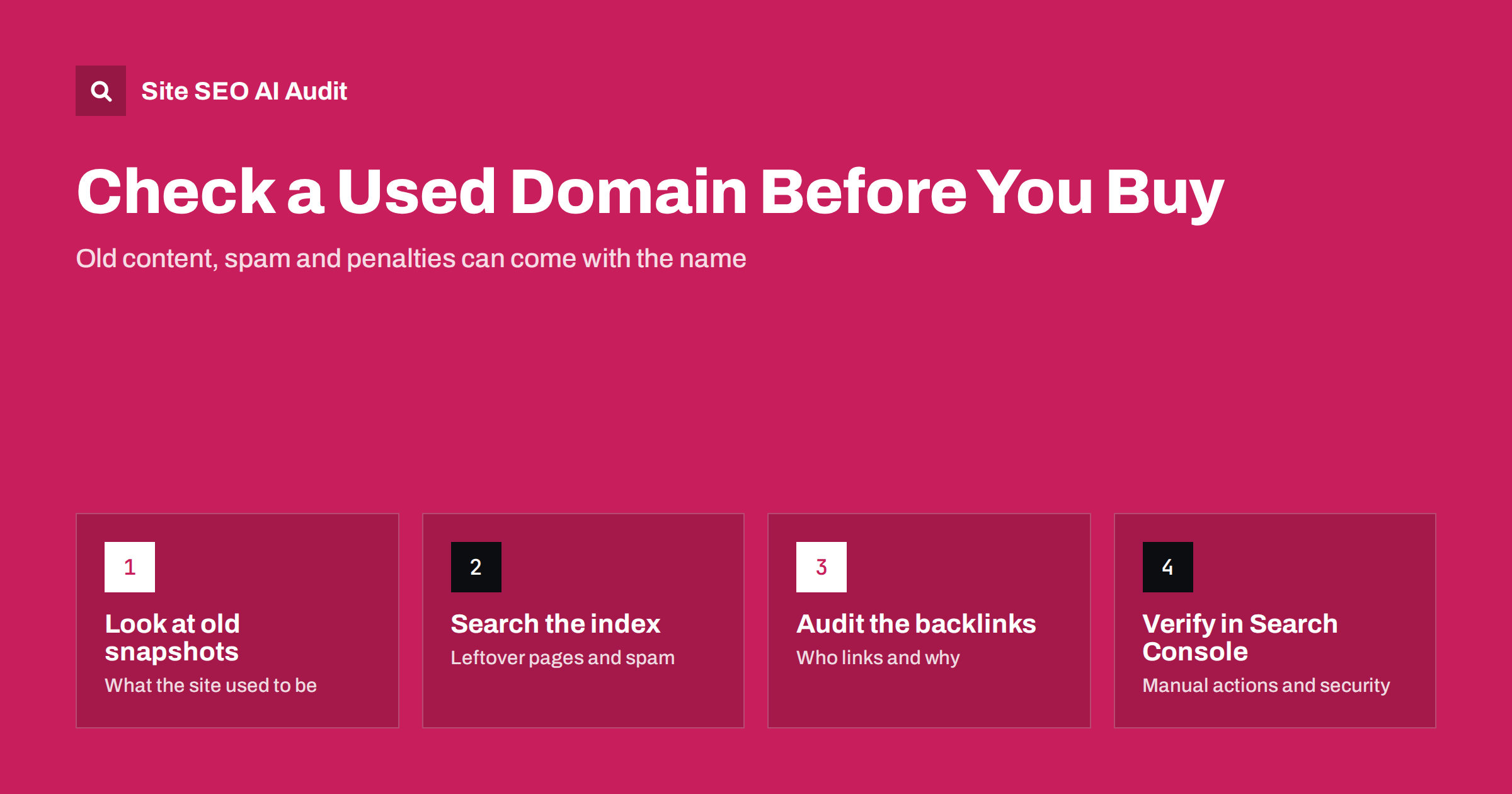
Short answer: A domain that has been registered before carries its history with it: old pages still in search indexes, backlinks from other sites and, sometimes, spam or a manual action. Before you buy, look at archived snapshots of the old site, search the index for leftover pages, review the backlink profile and, right after the transfer, verify the domain in Google Search Console. If the history shows spam, hacked content or link schemes, either walk away or plan a clean-up before you launch.
A short, memorable domain is often already taken, and the second-hand market is full of names that someone owned, used and let expire. Many of them are perfectly fine. Some, however, were used for spam pages, link networks, gambling or pharmacy content, or were hacked and filled with thousands of junk URLs. Search engines do not reset a domain’s reputation just because the owner changes, so a few hours of checking before payment can save months of confusion after launch.
Why a domain’s history matters for SEO
Search engines see a domain as a long-running record, not a fresh start each time it changes hands. Several things can carry over to the new owner:
- Indexed URLs. Pages the old site had may still be in the index, and search engines keep requesting them for a long time. Your new site will answer those requests with errors or, worse, with the wrong content.
- Backlinks. Links from other sites still point to the domain. Relevant links from real sites can be a small benefit; links from spam networks, hacked sites or paid link schemes are a liability.
- Manual actions. If a reviewer applied a manual action for spam, it is tied to the property and can still be visible after the transfer.
- Brand associations. Searchers, review sites, forums and AI answers may still connect the name with the previous business.
- Email and security reputation. A domain that sent spam or hosted malware may be on blocklists that affect your email and browser warnings.
None of this means that used domains are bad. It means you should know what you are buying, in the same way you would check the history of a used car.
Step 1: Look at what the site used to be
Start with archived snapshots. The Internet Archive’s Wayback Machine shows how many sites looked in the past. Enter the domain and look at captures from several years, not only the most recent one.
- Check the topic of the old site. A domain that hosted a bakery for ten years is a different risk from one that switched to casino reviews in its last two years.
- Look for sudden changes in language, design or subject. A sharp switch often means the domain expired and was bought to exploit its links.
- Note any pages with long lists of outbound links, doorway pages for many cities, or keyword-stuffed text. These are classic signs of a site used for search manipulation.
- Save a list of the old site’s main URLs. You will need it later to decide which ones to redirect and which ones to let return 404 or 410.
If there are no snapshots at all, that is not automatically a problem, but it means you need to rely more on the other checks.
Step 2: Search the index for leftover pages
Next, see what search engines still remember. A site: search, such as site:example.com, gives a rough picture. It is not a complete list, but it is enough to spot trouble.
- Foreign-language or off-topic pages in the results, especially pharmacy, gambling, adult or loan keywords, usually mean the domain was used for spam or was hacked.
- Thousands of results for a site that looked small in the archive suggest auto-generated pages.
- Japanese or Chinese characters in titles on an English site are a common pattern of hacked-site spam. Our guide on hacked site SEO spam describes it in detail.
- Search the brand name on its own. Results about a previous business, complaints or scams tell you how people may react to the name.
Repeat the search in other search engines too. Leftover pages tend to linger in some indexes longer than in others.
Step 3: Review the backlink profile
Backlinks are where most hidden risk lives. You can use a third-party backlink tool, and once you own the domain, the Links report in Search Console shows a sample of linking sites. Look at the pattern rather than a single score:
| Signal | Usually fine | Warning sign |
|---|---|---|
| Linking sites | Real businesses, local media, directories of the old trade | Hundreds of unrelated blogs, link farms, expired sites |
| Anchor text | Brand name, plain URL, natural phrases | Exact commercial keywords repeated many times |
| Language and topic | Matches the old site | Random languages and topics with no connection |
| Growth pattern | Slow and steady over years | Sudden spikes of thousands of links |
| Target pages | Home page and real content pages | Pages that no longer exist or never had real content |
Do not buy a domain only because a tool says it has “strong authority”. Many expired domains are sold on that promise. Search engines aim to ignore or neutralise links that exist to manipulate rankings, and Google’s spam policies specifically describe the abuse of expired domains to host unrelated content. A domain bought for its links and filled with unrelated content is exactly what those policies target.
Step 4: Check email and security blocklists
A domain’s reputation goes beyond search. Before you rely on it for business email or a shop, check it against common email blocklists and safe-browsing lookups. A domain that was used to send spam or host malware can cause:
- your newsletters and invoices landing in spam folders;
- browser warnings when people visit;
- security tools in companies blocking links to your site.
Most blocklists have a delisting process, but it takes time and you need to show that the new owner has nothing to do with the old activity. It is easier to know about it before you pay.
Step 5: Verify in Search Console as soon as you own it
Search Console shows information that no outside tool can, and you can only see it once you can verify ownership, usually by adding a DNS record. Do this on the first day after the transfer, even before the new site is live. Our Search Console setup guide explains the verification options.
- Manual actions report. If it lists an action, read the reason. You can request a review once the problem is fixed and you can explain that ownership has changed.
- Security issues report. Flags hacked content or malware that Google detected.
- Page indexing report. Shows which old URLs Google knows about and how it treats them. The page indexing report guide explains each status.
- Links report. Gives a sample of external links and the pages they point to.
- Removals tool. Lets you temporarily hide old URLs from results while you make them return 404 or 410.
Verify with a Domain property rather than a single URL prefix, so you see data for every protocol and subdomain the old owner may have used.
How to clean up after you buy a domain with history
If the checks show a mixed but manageable history, a clean launch is usually possible. Work through these steps:
- Decide what happens to old URLs. If the old site was on a related topic and some pages have genuine links, redirect them to the closest matching new page with a 301. Do not redirect everything to the home page; that usually counts as a soft 404. See 301 vs 302 redirects for the difference.
- Let spam URLs die. Old spam pages should return 404 or, better, 410, so search engines drop them. Our guide to HTTP status codes explains how each code is treated.
- Remove leftover subdomains. Spam often lived on subdomains. Delete their DNS records or make them return errors.
- Disavow only if needed. If you have a manual action for unnatural links, or a clear pattern of spam links you cannot remove, use the disavow tool for those domains. For most sites without a manual action it is not necessary.
- Request reconsideration. If there is a manual action, fix the cause, document what you did and request a review, mentioning the change of ownership.
- Launch real content. Publish genuinely useful pages, submit an XML sitemap and monitor how quickly the old URLs disappear.
Expect the clean-up to take weeks rather than days. Search engines revisit old URLs on their own schedule, and spam URLs can keep appearing in reports for a long time after they return 410.
When to walk away
Some histories are not worth fixing. Consider another name if you find:
- an active manual action for pure spam or for site-wide unnatural links;
- years of content in a field you would never want to be associated with;
- tens of thousands of indexed spam URLs on many subdomains;
- a brand name still strongly connected with a scam or a failed company;
- a seller who pushes “authority” or “link juice” as the main reason to pay a high price.
A new domain with no history starts slowly, but it starts clean. In most cases that is a better foundation than a famous-looking name with a bad record.
Audit the site after launch
Once the new site is live, check it as a whole: are old URLs returning the codes you planned, are redirects pointing to the right pages without chains, and is anything still indexable that should not be? Site SEO AI Audit crawls your site like a search engine and checks crawl and index issues, status codes, redirects, canonicals and links on every page, then ranks the fixes by how many points each one adds. On WordPress sites every issue comes with step-by-step fix instructions. The first audit of up to 200 pages is free, and you can start it from the home page.
Related reading
- Hacked site SEO spam: how to find and remove it
- How to remove a page from Google
- Redirect chains and loops: how to fix them
- Site migration SEO checklist
The bottom line
A used domain comes with its past: indexed pages, backlinks, possible penalties and reputation. Check archived snapshots, the index, the backlink pattern and blocklists before you buy, and verify the domain in Search Console on day one. Clean, related history is an asset; spam history is a project. If the checks look bad, a fresh domain is usually the faster route.
FAQ
Does a new owner reset a domain’s SEO history?
No. Search engines keep their record of URLs, links and past problems when a domain changes hands. A change of owner does not remove a manual action or old spam pages automatically. You need to clean them up and, if there is a manual action, request a review.
Can I see manual actions before I buy a domain?
Not directly. The Manual actions report in Search Console is only visible to verified owners. Before buying, you can only infer risk from the archive, the index and the backlinks, so verify the domain in Search Console right after the transfer.
Are expired domains with many backlinks worth buying for SEO?
Rarely for the links alone. Search engines try to ignore links that no longer match the site’s content, and using an expired domain to host unrelated content is described as spam in Google’s policies. Buy a domain because the name fits your brand, and treat any relevant links as a small bonus.
Should I redirect all old URLs to my home page?
No. Redirect only old pages that have a close equivalent on your new site. Everything else should return 404 or 410. Mass redirects to the home page are usually treated as soft 404s and pass no value.
Do I need to disavow links on a used domain?
Usually only if there is a manual action for unnatural links or an obvious large pattern of spam links you cannot remove. For most domains without a manual action, search engines already ignore such links, and disavowing is not required.